AI voiceover is a technology that transforms text content into an audio track using artificial intelligence algorithms. While early speech synthesis sounded mechanical, modern neural networks create voices that are nearly indistinguishable from a live human speaker. This is made possible by LLM-based models, which understand context, apply correct stress, and convey the right intonation.
Saves Time and Budget: Creating an audio version of a video used to require a week of studio work and payments to voice actors. Now it takes minutes, and costs are reduced by 10-20 times. For a YouTube channel with 100 videos per year, this results in savings of thousands of dollars.
Content Scalability: One script can be voiced in 20 languages in an hour thanks to AI text-to-speech. Polyglot neural networks support rare accents and dialects, which was previously impossible.
Accessibility for All: No special equipment is needed—just a browser and text. AI voiceover is equally accessible to freelancers, students, small businesses, and large corporations.
Personalization and Control: You can clone your own voice or create a unique character. AI speech generation allows you to manage emotional tone, speaking speed, and pauses—features that previously depended on acting skills.
Today, AI voiceover is used in podcasts, audiobooks, advertising, corporate videos, educational courses, and even video games. This technology is no longer a marginal tool—it's a professional-grade content production standard.
The AI voiceover process consists of three stages. Understanding this mechanism helps in choosing the right service and properly preparing your material.
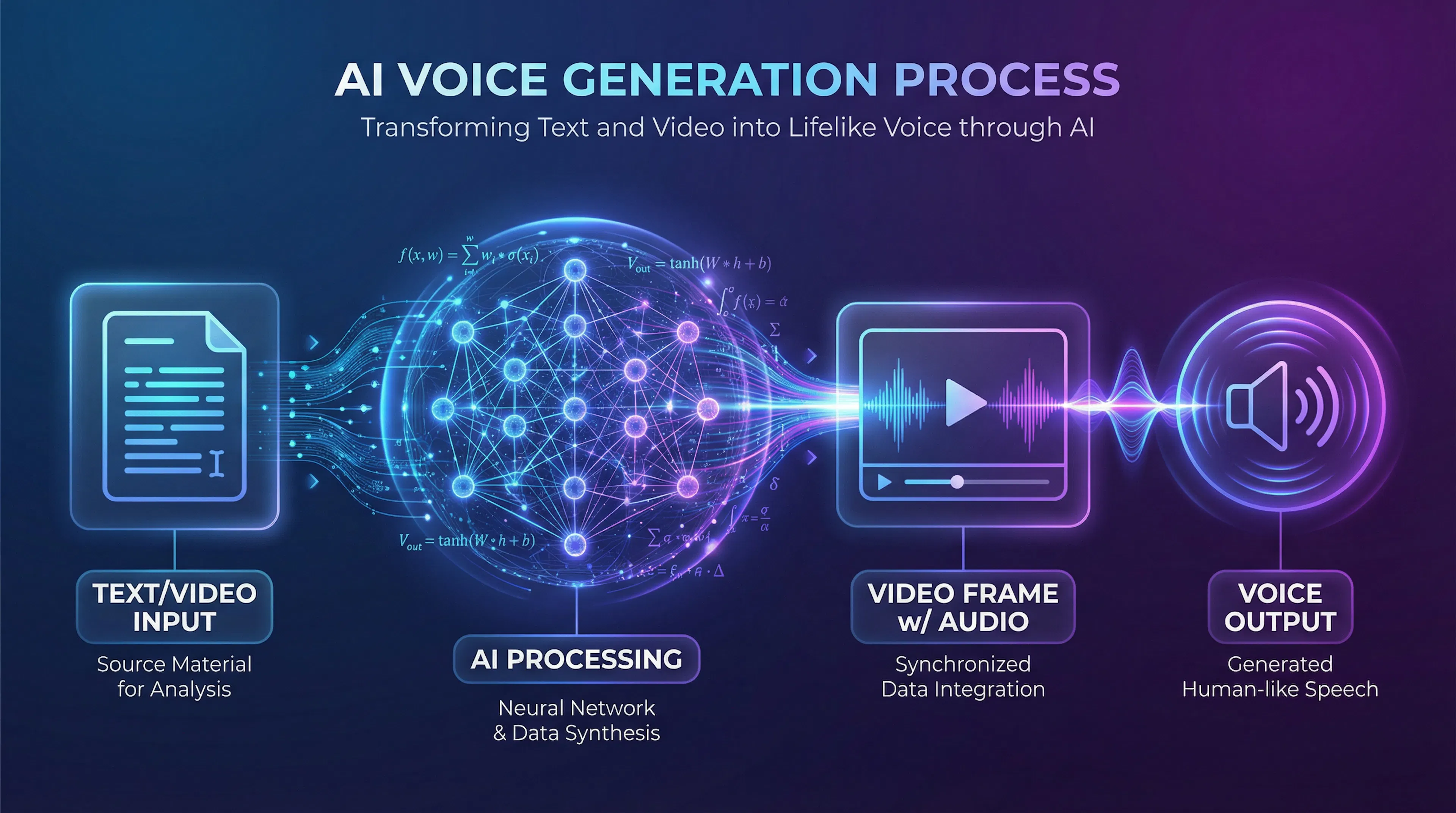
Stage 1: Text Analysis & Context Understanding
When you upload a script to a voiceover service, the neural network first analyzes its structure. The algorithm recognizes punctuation, numbers, abbreviations, and determines where pauses should be. For example, a period is a full pause, a comma a short stop, and an exclamation mark prompts an exclamation or voice emphasis.
At this stage, the model also analyzes the meaning of sentences. For the phrase "What do you want?", the AI voice synthesis will raise the intonation at the end, mimicking a live question. A classic TTS would read it monotonously.
Advanced systems based on Large Language Models (LLMs) even "guess" the emotional tone of the text. A sad story gets a slower pace; advertising copy gets energy and confidence in the voice.
Stage 2: Sound Wave Synthesis
After analysis, AI speech generation begins. The neural network transforms the analyzed text into acoustic characteristics: pitch, volume, sound duration, voice timbre. This process is called speech signal modeling.
Modern services use voice cloning techniques: you upload a sample of your voice or an actor's voice (a few minutes of audio), and the model reproduces it in the context of the new text. This means your personal voice reads a completely new script while retaining characteristic diction and timbre features.
Stage 3: Processing & Export
The system processes the finished audio track: removes artifacts, normalizes volume, sometimes adds background sounds. You receive a file in MP3, WAV, or other format, ready to be embedded into a video or published as a podcast.
If you're voicing a video, the service synchronizes the audio with the video. Advanced platforms automatically determine where voiceover pauses should be to match scene transitions or on-screen text appearance.
Text to Finished File: The Process is Similar
The process for AI video voiceover is similar: you upload a video file, the service extracts text from subtitles or you insert it manually. Then voiceover occurs, and the finished audio track is automatically synced and laid under the video. The main difference from text-only voiceover is that the system must consider visual context—if a character opens their mouth at the 10-second mark, the voiceover should start at roughly the same time.
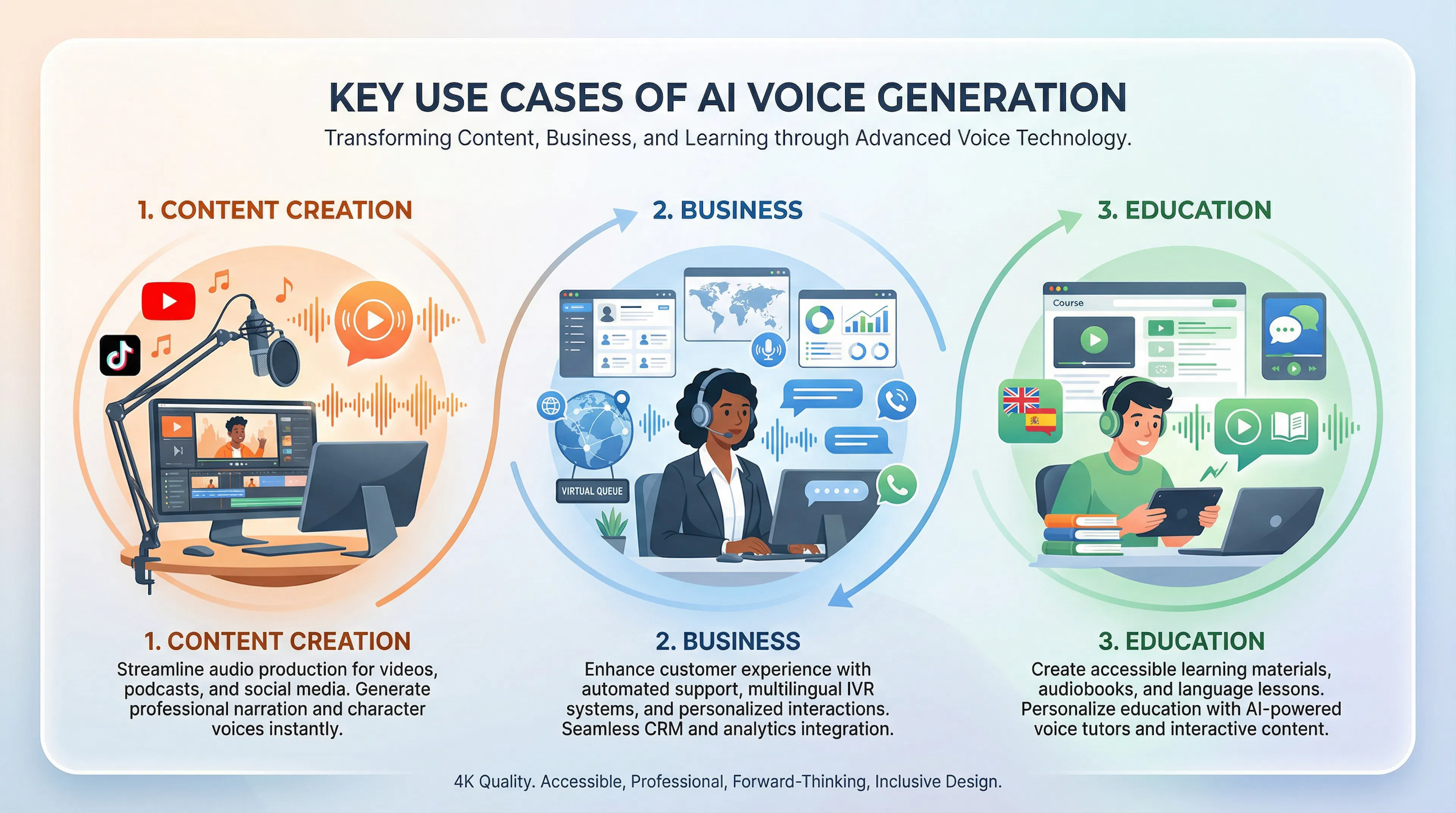
AI voiceover has moved beyond experiments and become a working tool in dozens of industries.
YouTube & Streaming Content
Bloggers use AI text-to-speech to speed up video releases. Instead of recording their own voice, they upload a script and get a finished voiceover in five minutes. For channels with weekly releases, this saves months of work per year. Popular services allow voice selection (male, female, different accents), offering creative flexibility.
Podcasts & Audiobooks
Authors create podcasts without studio equipment. AI speech synthesis allows voicing an entire book in a day, whereas professional recording would take weeks. Platforms like Audiobooks.com and Storytel actively use neural networks for voiceover precisely because it significantly lowers entry barriers for independent authors.
Corporate Sector & IVR
Companies invest in AI voice synthesis for auto-attendants and internal systems. Call centers can now offer callers a polite robot instead of a boring mechanical voice. AI text-to-speech is also used for creating corporate video instructions: safety guides, employee training, investor presentations.
Education & e-Learning
Online learning platforms (Coursera, Udemy, internal corporate LMS) use AI document voiceover to create audio versions of lectures. Students can listen to material while commuting, working out, or before sleep. This especially helps people with visual impairments and those who absorb information better by ear.
Localization & Translation
Movie studios and game developers use AI video voiceover for dubbing into different languages. Instead of hiring actors for each language, just one original voice recording is needed, and the neural network voices the film in Spanish, German, Chinese. The character sounds recognizable but speaks correctly in the target language.
Marketing & Advertising
Agencies create ad videos with AI voiceover, reducing time-to-market. Instead of coordinating with voice actors and recording in a studio, they can quickly test several voiceover options and choose the best. AI speech generation allows experimentation with tone: the same phrase sounds different depending on the chosen voice and emotional style.
AI voiceover applies to different content types, each with its own specifics, quality requirements, and tool choices.
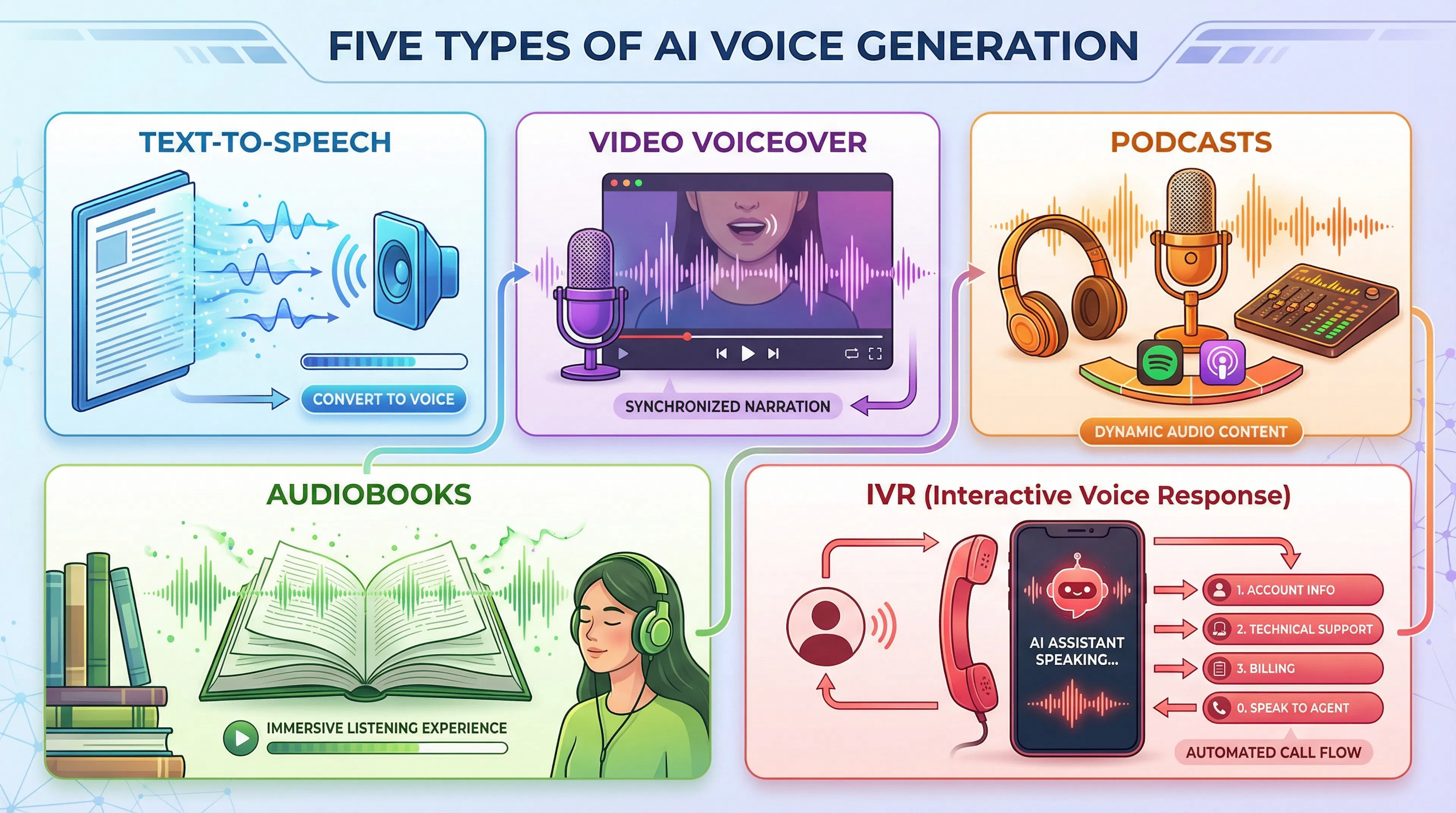
The main difference lies in the source material format and usage goals. Voicing static text requires minimal setup—upload text, choose a voice, get an audio file. AI video voiceover is more complex: it requires audio-video synchronization, consideration of visual elements, and proper timing of pauses.
Podcasts and audiobooks are an intermediate type. Here, voice quality and speech naturalness are most critical because the listener is focused solely on audio. IVR systems and voice bots are a separate category: here, short, clear phrases, understanding of dialogue context, and fast request processing are needed.
Voicing text content is the simplest way to start with AI voiceover. A script doesn't require video synchronization; you have full control over speech pace and tone.
When to Choose Text Voiceover
This form is suitable for blog articles that readers want to listen to in the background. A journalist writes material, uploads it to an AI voiceover service, and the article becomes a podcast. Readers can consume content while commuting or working out.
Companies voice documents—orders, instructions, memos—for internal use. An employee listens to an audio version instead of reading a 10-page PDF. AI document voiceover saves time and improves information retention.
Video scripts also often start with text voiceover. You write the speech for a vlog or clip, voice it, and then match visual content to the finished audio track. This "script-first" mode is more economical than shooting video and then searching for a voice.
How the Process Works
Upload text to the service's editor (Voicemaker, ElevenLabs). You immediately see a list of available voices—choose suitable ones by gender, age, accent. Configure speech speed (usually from 0.5x to 1.5x), emotional style (if supported), and click "Generate." AI speech generation takes from several seconds to several minutes depending on text volume.
Download the result in MP3, WAV, or other formats. Some services add editing capabilities: if a word was voiced incorrectly, you can re-voice only that fragment.
Specifics & Tips
Quality depends on text quality. If the text has many typos, strange punctuation, or complex words, AI text-to-speech may sound odd. The service voices exactly what's written: if "1000" is written, the neural network may read "one zero zero zero," not "thousand."
For long texts (over 5,000 characters), the service may split the voiceover into parts. Ensure pauses between parts are natural and the text sounds cohesive.
The best services for text voiceover offer and support various emotional tones, allowing adaptation to genre: business tone for instructions, friendly for blogs, serious for analytics.
Voicing video content is more complex than text, as sound must match the video. But technology has advanced to where synchronization often happens automatically.
YouTube & Long Formats
On YouTube, AI video voiceover saves months of work. Instead of recording your own voice (microphone, audio recording, editing), you upload a video with subtitles or insert a script—and the service voices the clip. AI video voiceover allows choosing a voice that fits your content best: serious for analysis, friendly for lifestyle, clear and slow for education.
Channels about games, tech, and education actively use this technology. Instead of sitting with a microphone and re-recording text, they simply write a script, and AI video voiceover sounds professional.
TikTok & Reels: Short Formats
For short videos (15–60 seconds), voiceover is even simpler. AI voiceover on TikTok is often built into the app—you choose from ready-made voices and the clip is voiced in a couple of taps. The process is similar on Reels (Instagram) and YouTube Shorts.
Short clips require a fast pace and clear diction. AI speech generation works best here because there's no time for "wooden" parts—everything must be concise and energetic.
Synchronization & Technique
When voicing video with AI, the algorithm analyzes the video and automatically places pauses in the voiceover. If there's on-screen text or a scene transition, the system tries to align the voiceover with these moments. If synchronization isn't perfect, most services allow manual shifting of the audio by milliseconds.
Important: AI video voiceover works better if your source script is clearly structured. Paragraphs, punctuation, logical pauses—all help the service voice the material correctly.
Use Cases
Educational channel authors voice tutorial videos. Marketers create ad videos with AI voiceover—faster and cheaper than hiring an actor. Game developers dub videos into different languages, preserving the main character's recognizable voice thanks to voice cloning.
For podcasts and audiobooks, voiceover quality is critical. The listener is focused only on sound, so any artifact or unnaturalness will be noticeable. Here, AI voiceover must sound maximally lifelike.
Podcasts: New Opportunities
Podcast creators often choose between recording their own voice and using AI text-to-speech. If you write a script (instead of improvising), AI voiceover offers advantages: no need for a studio, microphone, or sound engineer. You write, upload to the service, get a finished episode.
AI podcast voiceover works especially well for informational podcasts (news, analysis, education). For entertainment formats (comedy, conversations), a live voice is still preferable, though new models already capture jokes and change intonation.
Platforms like Podcastle and others are specifically optimized for podcasters. They allow choosing a voice that suits your show's tone and quickly voicing an entire episode.
Audiobooks: Scaling Literature
AI audiobook voiceover is a revolution for independent authors. Previously, professional book recording cost thousands of dollars and took weeks of studio work. Now an author can upload text and get a finished audiobook in a day.
Modern voiceover quality allows competing with professional publications. AI text-to-speech for audiobooks supports different emotional styles: a sad scene is read slower and quieter, a tense moment faster and louder.
Platforms like Google Play Books and Amazon Audible have started offering authors built-in voiceover. This means every uploaded book automatically gets an audio version available to listeners.
Quality Requirements
For podcasts and audiobooks, voice choice is critical. A male voice suits detective and business literature; a female voice suits novels and lifestyle. AI speech synthesis should support various accents and dialects if the text has dialogues with different character voices.
Speech pace is also important. For audiobooks, 0.9–1.1x speed is recommended (slower than video). The listener needs time to absorb information and imagine the scene.
Monetization
Authors earn money from AI-voiced audiobooks. Platform commissions are lower than if a live narrator worked, so margins are higher. This is especially profitable for independent authors and small publishers.
IVR (Interactive Voice Response) systems are what you hear when calling a bank or tech support. These used to be lifeless robot voices that irritated listeners. Today, AI voiceover has transformed IVR into a friendlier, more effective tool.
How AI-Based Voice Menus Work
When you call a company, the system voices a greeting: "Welcome, please choose an option." Previously, these were recordings of live narrators or monotone synthetic voices. Now AI text-to-speech creates voices that sound natural, polite, and even somewhat empathetic.
AI voiceover for IVR systems allows companies to:
Voice Bots & Assistants
AI speech generation is used in chatbots and voice assistants. When a bot answers your phrase, voiceover happens in real time. This requires fast synthesis and high quality—the system can't wait 10 seconds for a response to be voiced.
Services like Google Assistant and Yandex.Alice use advanced AI voiceover models that don't just read text but understand dialogue context. If you ask in a sad voice, the assistant responds sympathetically. If you're in a hurry, the response is faster.
Technical Advantage
AI video voiceover and voice systems require the same technology—fast synthesis. But for IVR and bots, minimal latency is most critical. The service must voice a response within milliseconds, otherwise the dialogue breaks and the user loses interest.
Modern platforms like Google Cloud Text-to-Speech and Amazon Polly provide synthesis in 100–500 milliseconds—fast enough for a bot conversation to seem natural.
Costs & Benefits
A company that voices its IVR system with AI saves on recording professional narrators. If the menu needs updating, there's no need to hire a studio—just change the text in the system, and new voiceover is ready in minutes.
To properly choose a voiceover service and understand its capabilities, it's useful to know the technology's inner workings. Over the past five years, speech synthesis has evolved from mechanical voices to ones nearly indistinguishable from humans.
Classic TTS: History & Working Principle
Text-to-Speech (TTS) technology for converting text to speech appeared in the 1960s. Early systems were simple: the algorithm split text into phonemes (sounds) and reproduced them sequentially. The result sounded like a robot reading syllable by syllable.
Classic TTS works in two stages. First, the system analyzes text: splits into words, determines stress, understands how numbers and abbreviations are pronounced. Second, it synthesizes sound: converts phonemes into an acoustic signal using pre-recorded voice fragments or mathematical models.
The result was predictable and understandable but sounded unnatural. Neural network synthesis changed this.
Neural Network Speech Synthesis: A Quality Revolution
In the early 2010s, the first neural network models for speech synthesis appeared. Instead of rules and phonemes, the system trained on examples of live speech and learned to predict how each phrase should sound in context.
Neural network speech synthesis works like this: the model analyzes not just text but its meaning. If the sentence is "What do you mean?"—the neural network understands it's a question and raises intonation at the end. If it's "Stop."—it understands it's a command and makes the voice sharper.
The key difference from classic TTS is that the neural network learns from data, not rigid rules. It can reproduce pauses, breathing, even micro-vibrations of the voice that make speech lifelike. This led to creation of voices nearly indistinguishable from human ones by ear.
LLM-Based Speech Synthesis: The New Generation of Voiceover
In 2024–2025, a new generation of synthesis emerged—based on Large Language Models (LLMs). Instead of two separate neural networks (one analyzes text, the other synthesizes sound), a single model is used that understands context more deeply.
LLM-based AI voiceover allows:
For example, the word "замок" (castle/lock) can be read two ways. An LLM model analyzes sentence context and chooses correct stress automatically.
Voice Cloning & Personalized Models
One of the most interesting capabilities is voice cloning. AI text-to-speech can reproduce your voice or a famous actor's voice. This requires just one to two minutes of audio recording, and the model learns to copy characteristic features: timbre, manner of speaking, pronunciation peculiarities.
This is used for video voiceover when a character needs to speak another language but sound recognizable. Or for creating personal voice assistants.
Emotions, Intonation & Voice Naturalness in 2026
Modern neural networks understand text emotions. If the script is about love, AI voiceover sounds tender. If about war—harsher. This isn't just speeding up or slowing down—it's a complete reworking of intonation patterns.
Neural network speech generation now supports:
Result: the listener hears not a robot but a person who thinks, breathes, and experiences.
Understanding differences between the two approaches helps you choose the right service for your tasks. Some platforms still use classic TTS; others have fully migrated to neural network synthesis.
Classic TTS: Rigid Rules
Classic speech synthesis is based on linguistic rules. The system analyzes text via dictionary, splits words into phonemes, and reproduces them according to pre-set rules. If the word "слово" contains the letter "o," the system reads it a certain way—without variations.
The result is predictable but sounds monotone. Pauses are placed mechanically (period = long pause, comma = short). Stress is often incorrect because the system doesn't analyze context—it just applies general rules.
AI Text-to-Speech: Understanding Meaning
Neural network synthesis works differently. The model doesn't follow rigid rules—it predicts how a phrase should sound based on examples of live speech it was trained on.
The neural network analyzes not letters but meaning. If you write: "Are you going to the park?" the system understands it's a question and automatically raises intonation at the end. If: "You are going to the park."—it sounds like a statement, intonation flat.
A neural network can reproduce:
Comparison in Numbers & Examples
| Criterion | Classic TTS | Neural Network Synthesis |
|---|---|---|
| Naturalness | 40–50% | 85–95% |
| Processing Speed | Fast (0.1 sec) | Slower (0.5–2 sec) |
| Rare Word Quality | Poor | Good |
| Emotionality | None | Present (in advanced models) |
| Cost | Cheaper | More expensive |
| Where Used | Old IVR systems | YouTube, podcasts, modern bots |
Practical Example
Let's voice the phrase: "Are you reading 'War and Peace'?"
Classic TTS would read: "You-are-read-ing. War-and-Peace." Stress incorrect, question intonation not heard.
AI text-to-speech would voice: "Are you READ-ing 'War and Peace'?"—with correct stress, interrogative intonation at the end, and natural pauses before the book title.
Where Classic TTS Is Still Used
Despite neural network advantages, classic TTS is still applied where minimal latency is critical. Some voice bots, old navigators, and security systems use classic synthesis because it works within milliseconds.
But if you're creating content for YouTube, podcasts, or audiobooks, classic TTS is no longer suitable. Listeners will immediately notice unnaturalness. AI voiceover based on neural networks is the quality standard in 2026.
LLM-based speech synthesis is the breakthrough of 2024–2025 that changed understanding of what a neural network can do. Instead of separate models for text analysis and sound generation, a single large language model is used that understands context more deeply.
How LLM-Based Voiceover Works
Traditional neural network speech synthesis used a two-step process: first text is converted to acoustic parameters, then these parameters are turned into sound. An LLM model works differently—it analyzes the entire context at once and understands how the phrase should sound as a whole.
LLM-based AI voiceover allows the model to:
For example, if the text is: "Oh sure, that's the best way,"—the LLM will understand sarcasm and voice the phrase with irony. Classic TTS or even older neural networks would read it literally.
Managing Emotional Tone
The main advantage of LLM-based AI voiceover is emotion control. You don't just choose a voice (male, female, accent), but also set style:
AI text-to-speech now sounds not the same for all phrases, but like real reading by an actor who understands the meaning of what they're pronouncing.
2026 Examples
SberBank launched its LLM-based speech synthesis called GigaChat in late 2025. The system can voice a business document formally and a love letter tenderly. This led to a 30% reduction in voiceover cost with improved quality.
AI video voiceover on platforms like ElevenLabs now uses an LLM approach, allowing synchronization not only of sound with video but also of voiceover emotional tone with visual content.
Speed & Quality
Neural network synthesis used to take 0.5–2 seconds per phrase. LLM models work at the same speed, but the result is higher quality. For long texts, this means you get an audio file no slower than before, but it sounds twice as good.
The Future of Voiceover
In 2026, LLM-based synthesis becomes standard. Companies still using classic TTS are starting to fall behind. LLM-based AI voiceover will allow:
The key—it's no longer just technology but a tool that understands language as well as a human.
Voice cloning is one of the most impressive capabilities of modern AI voiceover. Previously, this was the prerogative of film and animation. Today, anyone can clone a voice in a few minutes.
How Voice Cloning Works
The process is simple: you upload an audio recording from one to five minutes long. This can be your voice, an actor's voice, or a famous person's voice. The neural network analyzes recorded characteristics: timbre, pitch, manner of speaking, pronunciation peculiarities, even breathing and pauses.
Based on this analysis, the model creates a "voice profile"—a unique set of parameters. Then, when you upload new text, AI text-to-speech reproduces it in the voice from the source recording. The result sounds as if that person read the new text themselves.
Cloning Accuracy in 2026
Modern services achieve 95–98% accuracy in voice reproduction. This means the difference between the original recording and cloning is almost imperceptible to an ordinary listener. Even a specialist can be mistaken.
LLM-based AI voiceover with voice cloning allows:
Practical Cases
The YouTube channel "Kinomani" uses AI text-to-speech with cloning of its host's voice. Instead of recording each episode, they write a script, upload it to the service, and the voiceover sounds like the host himself. This saved them hundreds of hours of studio work.
Video games use AI text-to-speech for dubbing into different languages. A character voiced by an American actor is voiced in German, Italian—and each sounds natural in its language, but the voice remains recognizable.
Personalized Voice Models
Besides cloning someone else's voice, you can create a fully personalized voice. This is a voice that exists only for you or your brand.
AI voiceover allows:
Major companies like Toyota and BMW have created their own personalized voices for their voice assistants. This strengthens brand recognition.
Ethical Issues & Protection
AI video voiceover with voice cloning has led to problems. Scammers can use a famous person's voice to create fake video (deepfake). Therefore, services have added protection:
In many countries, cloning someone else's voice without consent is illegal. AI document voiceover or public figures requires explicit permission from rights holders.
Cost & Accessibility
Voice cloning costs more than choosing a ready-made voice from a catalog. On ElevenLabs, it costs an additional $10–50 per month. But if you create a lot of content (YouTube channel, podcasts, tutorial videos), this pays off through time savings.
The main difference between voiceover in 2026 and five years ago is the ability to convey emotions. Modern AI voiceover sounds not just clearly, but vividly and persuasively.
How Neural Networks Understand Emotions
AI voiceover analyzes text for emotional content. If you write: "I'm so happy!", the system understands joy and voices the phrase faster, with higher intonation, a smile in the voice. If: "I'm very sad,"—the voice slows down, becomes deeper, pauses appear.
This isn't just speeding up or slowing down. Neural network speech generation changes literally everything: voice pitch, volume of individual words, vowel duration, consonant intensity. The model reproduces how a live actor would read this phrase with a specific emotion.
Managing Intonation & Style
Advanced voiceover services allow choosing speech style:
AI text-to-speech now offers not just "read this," but "read this like an experienced actor who understands meaning and conveys the right feelings."
Prosody: Rhythm & Speech Melody
Prosody is the rhythmic and intonational aspect of speech that makes it alive. It's not individual sounds but the melody the voice creates when pronouncing a phrase.
AI text-to-speech reproduces:
Result: the listener doesn't think "it's a robot," but hears a person.
Transformation Examples
The same phrase "I love you" can be voiced:
AI video voiceover uses this possibility: if a character in the video is crying, voiceover is sad; if laughing, voiceover is cheerful.
Naturalness in Real Projects
A YouTube channel with voiceover based on modern AI voiceover is practically indistinguishable from a channel with a live narrator. The listener understands emotions, follows rhythm, isn't distracted by unnaturalness.
Podcasts voiced with AI text-to-speech with proper intonation retain listener attention. If voiceover is monotone, a person disengages within a minute.
Limitations & Reality
Despite progress, AI voiceover still sometimes errs with context. If text contains irony that's hard to recognize, the model may read it literally. If there's a typo in the text, voiceover may sound strange.
But in 90% of cases, modern AI voiceover sounds so natural that the viewer doesn't notice it's synthetic. And that's already good enough for professional work.
The AI voiceover market in 2026 is developing rapidly. Dozens of platforms exist with different approaches: some focus on quality, others on accessibility, others on specialization. Choosing the right service depends on your tasks and budget.
The market has international giants (ElevenLabs, Google), and open-source solutions. Each approach makes sense in certain scenarios.
Next, we'll break down top services, specifics of voiceover, video specifics, and choose the right tool for your project.
ElevenLabs: Premium Quality & Flexibility
ElevenLabs is the market leader in AI voiceover in 2026. The platform offers 500+ voices in 29 languages. AI voiceover here achieves the highest quality thanks to LLM-based synthesis.
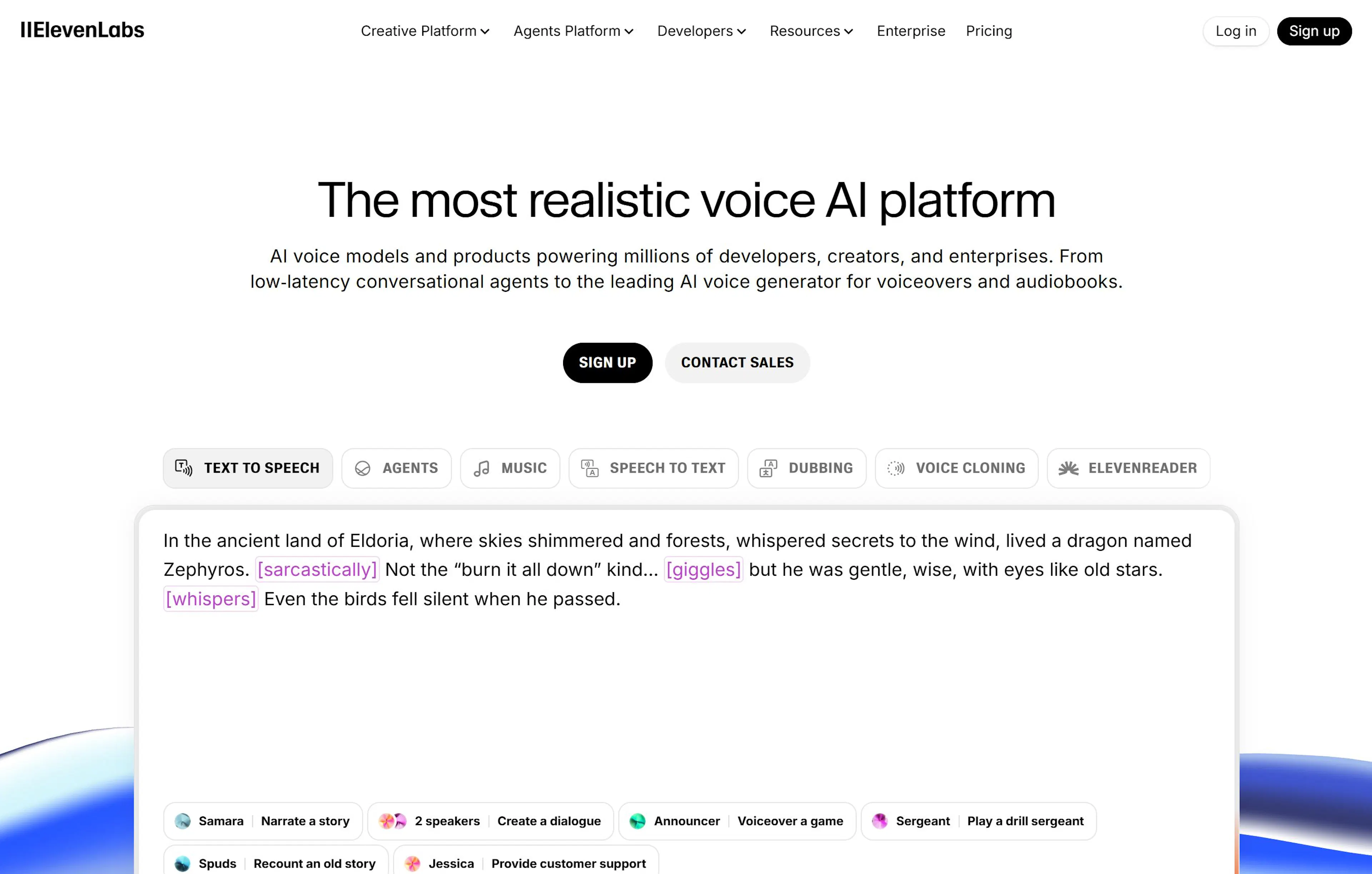
Key Capabilities:
Pros: Highest voiceover quality, professional voices, service reliability, large selection of speech styles.
Cons: High price ($5 to $99 per month), limited free tier (3000 characters per month), requires time to master all functions.
Who Chooses It: Professional YouTube channels, agencies, podcasters, and authors willing to pay for quality.
Voicemaker.in: Universal Solution for Beginners
Voicemaker is the ideal platform for those just starting with AI voiceover. AI text-to-speech works quickly and intuitively here—results in 5–10 seconds after uploading a script.
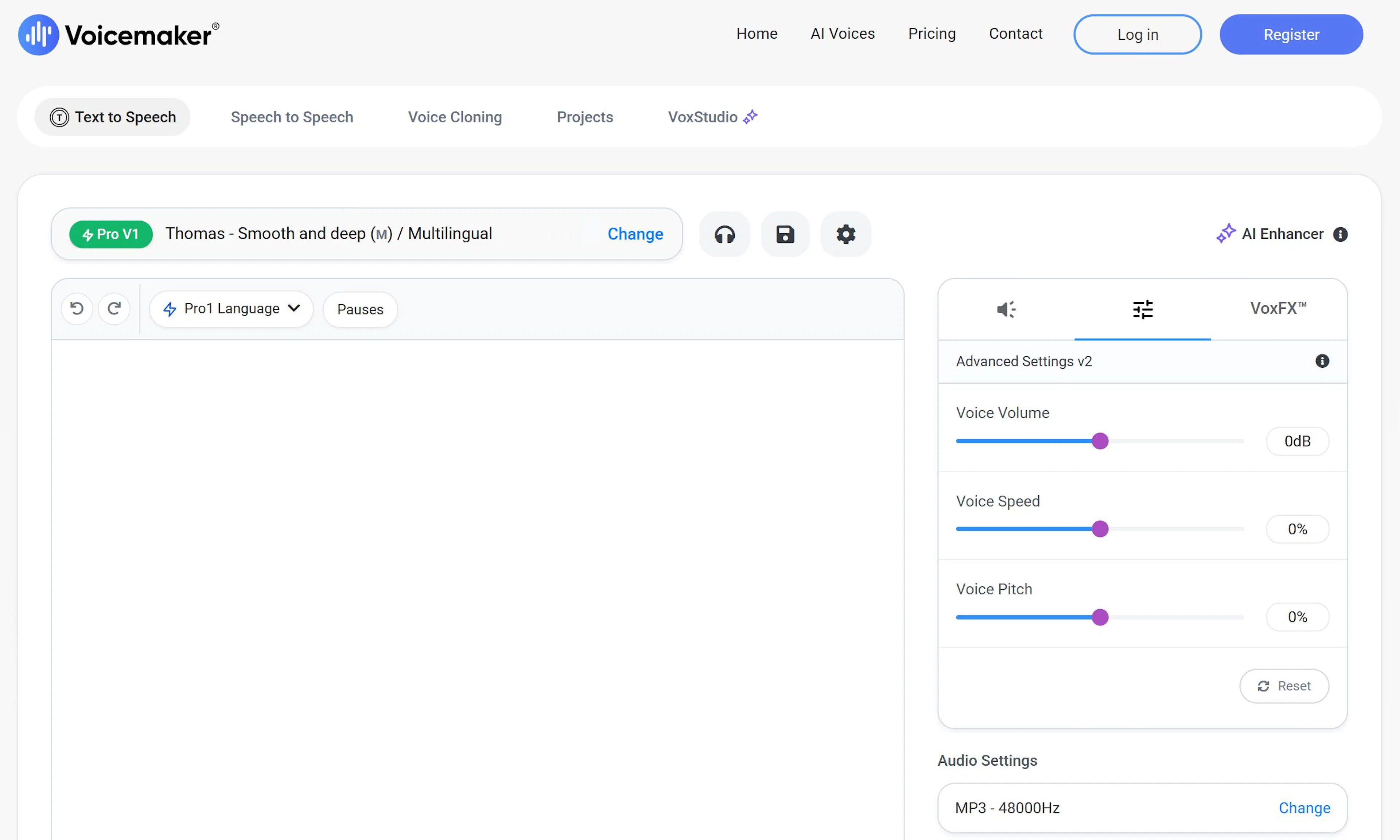
Key Capabilities:
Pros: Generous free tier (100,000 characters per month), huge voice selection, simple interface without unnecessary settings, fast processing, low price on paid plans.
Cons: Voiceover quality slightly lower than ElevenLabs, video-audio synchronization unavailable on free plan, fewer options for emotion management.
Who Chooses It: Beginners, bloggers, content makers wanting to save money and try voiceover without risk.
PlayHT: Video & Multilingualism
PlayHT is a specialized platform for video content voiceover. AI video voiceover works with automatic sound synchronization to video, critical for YouTube and social media.
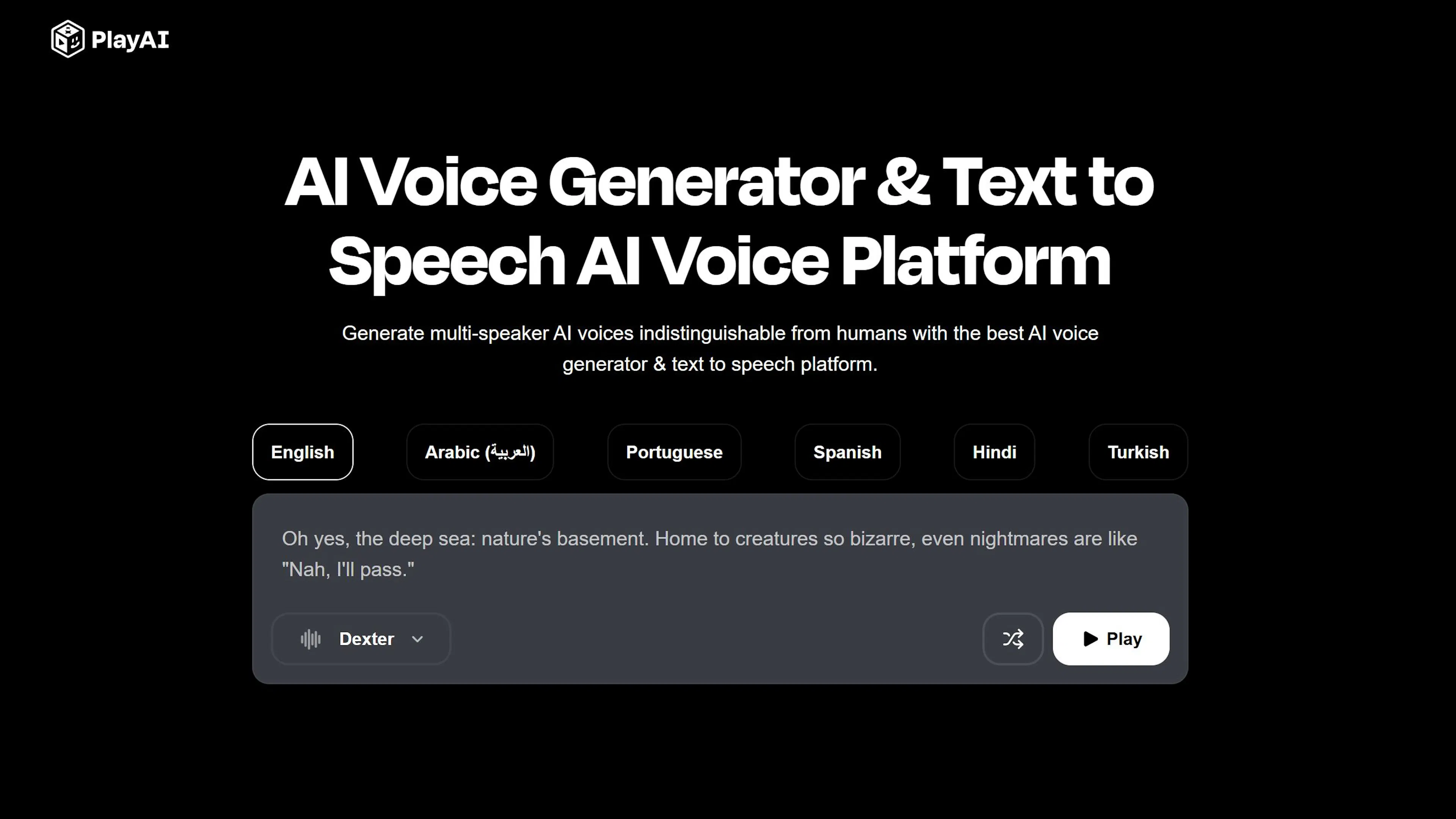
Key Capabilities:
Pros: Built-in video voiceover without additional tools needed, voice cloning, reliable synchronization, suitable for professional video production. Cons: High price (from $19 per month), interface more complex for beginners, requires time to master all video editor functions. Who Chooses It: YouTube creators, video producers, companies needing video voiceover with professional synchronization.
Murf.ai: Creating Videos with Characters
Murf.ai is a platform for comprehensive video content creation: voiceover + video avatars (talking heads). AI text-to-speech integrates with synthetic characters that read text on screen.
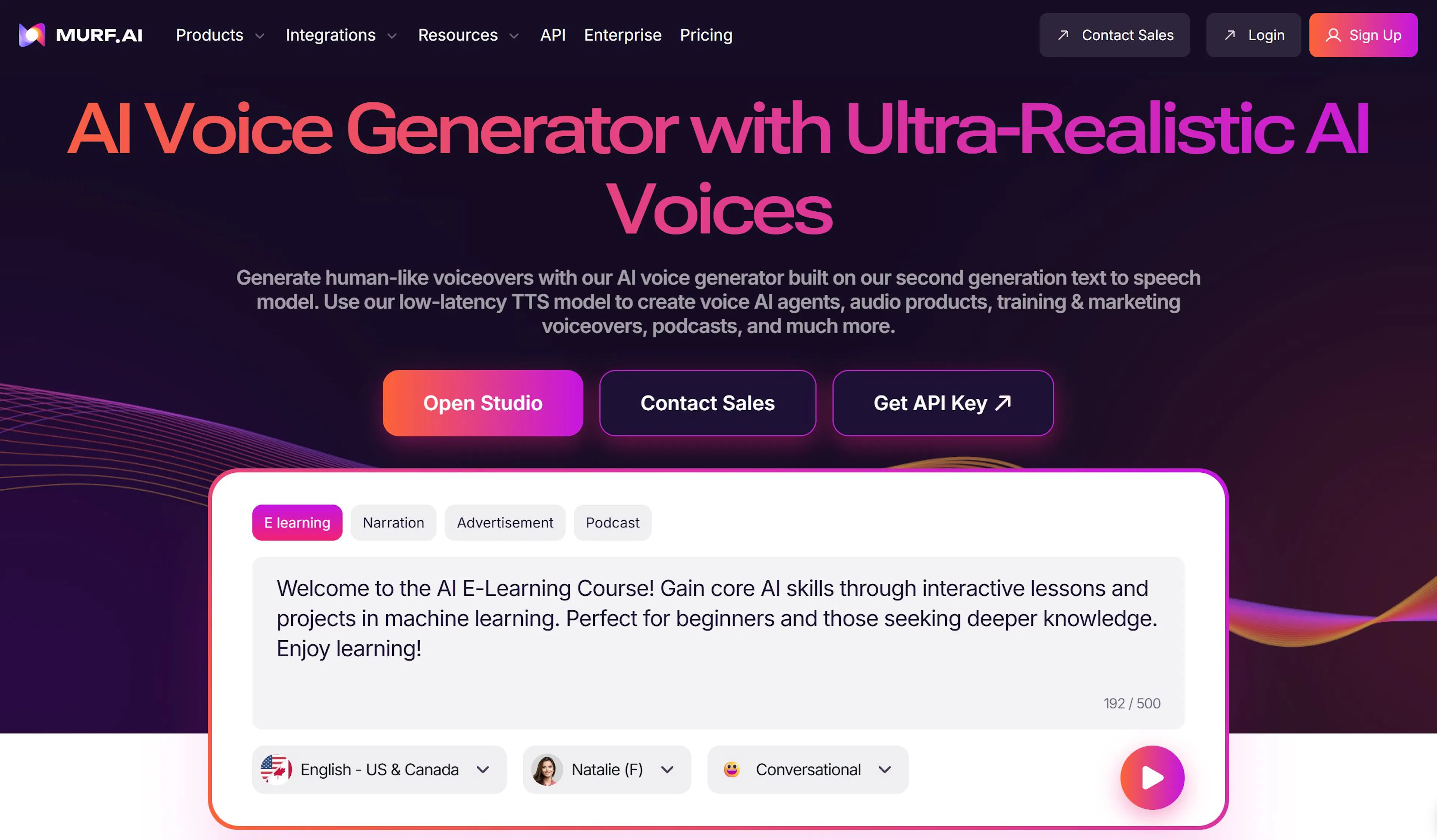
Key Capabilities:
Pros: Voiceover + video avatar in one place (no separate tools needed), built-in templates speed up creation, natural lip sync with voiceover, suitable for educational content and presentations.
Cons: More expensive than competitors (from $19 per month), may be excessive for simple text-only voiceover, requires subscription for access to all avatars.
Who Chooses It: Educational content creators, companies for internal videos, authors needing characters in videos.
Text voiceover is the simplest way to start working with AI voiceover. The process takes a few minutes: prepare text, choose a service, choose a voice, click "Generate."
But there are nuances affecting result quality. Text must be properly prepared, suitable voice chosen, and common beginner mistakes known.
In this section, we'll figure out how to voice text correctly on the first try, avoid common errors, and get professional results.
Main Stages:
Each stage is important for AI text-to-speech quality. An error at one stage can ruin the entire result.
AI voiceover quality depends 50% on source text quality. If text contains errors, strange punctuation, or unclear abbreviations, voiceover will sound strange. The neural network voices exactly what's written—without filtering or interpretation.
Text Preparation Rules
Error & typo checking. Before uploading text to a voiceover service, thoroughly check it for errors. A typo like "исползовать" instead of "использовать" will be voiced exactly as "исползовать"—with strange pronunciation. AI text-to-speech doesn't automatically correct errors.
Correct punctuation. The neural network analyzes punctuation for pause and intonation placement:
If text lacks punctuation or it's placed incorrectly, AI text-to-speech sounds monotone and unclear.
Splitting into fragments. For long texts (over 5,000 characters), splitting into parts is recommended. This helps:
Split by logical blocks: paragraphs, chapters, semantic pieces. Don't cut mid-sentence.
Processing Special Elements
Numbers & dates. How does the neural network voice the number "2025"? Some systems read "two thousand twenty-five," others "twenty twenty-five." Check in the service how it voices numbers and, if necessary, write numbers out: "two thousand twenty-five" instead of "2025."
Abbreviations & acronyms.
Signs & symbols. Periods, hyphens, quotes—the neural network skips them.
Text Structure for Video Voiceover
If you're voicing text for video, add synchronization information:
Example:
[0–5 sec] Welcome to our channel! [5–8 sec] Today we'll talk about voiceover. [8–15 sec] It's not as hard as it seems.
Such markup helps the service synchronize voiceover with video.
Pre-Voiceover Check
Before uploading text to the service:
AI voiceover is very sensitive to input data. Spending 5 minutes preparing text saves 30 minutes correcting the result.
Text voiceover in an online service takes 5–10 minutes. Here's the step-by-step process using popular platforms (Voicemaker, ElevenLabs, CyberVoice) as examples.
Step 1: Service Registration & Login
Open the chosen voiceover service's website. Create an account (email + password) or log in via Google. Most services offer a free tier with a monthly character limit. AI text-to-speech is usually available immediately after registration.
Step 2: Uploading or Pasting Text
Paste your text into the service's main window. Several ways:
AI voiceover shows character count and remaining limit on your plan. If text too long, split into parts.
Step 3: Choosing a Voice
The service will offer a list of available voices. You can choose by:
Click a voice to hear a sample (usually phrase "Hello, this is voice [name]"). AI text-to-speech sounds different depending on chosen voice—choose one that suits your content. Recommendation: listen to 2–3 voices before choosing. What sounds good on a sample may sound strange on your text.
Step 4: Configuring Voiceover Parameters Most services allow configuring:
Speech speed (0.5x to 2x): 0.9–1.1x optimal for comfortable perception. Slower for audiobooks and training, faster for ads and short videos. Tone & emotions (if supported): joyful, sad, calm, energetic. AI text-to-speech changes intonation depending on chosen tone. Volume & normalization: leave default if service advises. On ElevenLabs and some others, you can configure "Stability" and "Clarity"—leave standard values initially.
Step 5: Preview (If Available)
Before final generation, click "Preview" or "Listen." AI voiceover will play the first 10–20 seconds of text. Check:
If not satisfied—go back to Step 3 and choose another voice.
Step 6: Generating Voiceover
Click "Generate" or "Voice." The service will process text. Wait times:
During processing, you see progress (%), loading indicator, or simply wait.
Step 7: Listening to Result
After generation, the service will play the voiced file. Listen carefully:
If result good—proceed to Step 8. If not—you can edit individual fragments or regenerate with another voice.
Step 8: Exporting Finished File
Click "Download" or "Export." Choose format:
File downloads to your computer. AI text-to-speech is ready for use.
Tips & Saving Limits
Even experienced users make mistakes with AI voiceover. Knowing these errors helps avoid rework and save time.
Error 1: Text with Errors & Typos
The neural network voices exactly what's written. If you upload text with typos, AI voiceover voices them as is.
Example: "исползовать" instead of "использовать"—neural network voices strangely.
Solution: Check text for errors before uploading. Use built-in spell check (Ctrl+F7 in Word, or online services like Grammarly).
Error 2: Missing or Incorrect Punctuation
Punctuation is instruction for the neural network on how to voice text. Without punctuation, AI text-to-speech sounds monotone.
Example:
Solution: Add correct punctuation before voiceover. Periods at sentence ends, commas in lists, exclamation marks for emotion.
Error 3: Strange Voicing of Names & Rare Words
Neural network may voice proper names or rare words incorrectly.
Solution: For rare and foreign words, write a hint: "Jules (jules, French name)" or use individual word editing function if service supports it.
Error 4: Incorrect Voicing of Numbers & Dates
Neural network doesn't always understand whether to voice numbers as digits or words.
Example: "2025" may voice as "two thousand twenty-five" or "twenty twenty-five"—depends on system.
Solution: Write out numbers for important moments: "two thousand twenty-five" instead of "2025." For dates: "first of January two thousand twenty-six" instead of "01.01.2026."
Error 5: Choosing Wrong Voice for Content
Female voice for male character, energetic voice for sad text—AI text-to-speech sounds inconsistent.
Example: Voicing male text (from male author) with female voice—sounds strange.
Solution: Choose voice that suits your content. Male voice for male character, calm for audiobook, energetic for advertising.
Error 6: Ignoring Speech Speed Parameters
Using standard speed (1x) for all content—results in either too fast or too slow.
Solution: Configure speed per content:
Error 7: Voicing Very Long Text at Once
If voicing 10,000+ characters at once, neural network may make synthesis errors. Pauses incorrect, intonation broken.
Solution: Split long text into chunks (2000–5000 characters). Voice each chunk separately, then stitch audio files in audio editor (Audacity, Adobe Audition).
Error 8: Not Checking Result Before Downloading
Clicked "Voice," didn't listen to preview, downloaded immediately—got garbage.
Solution: Always listen to preview or first 10 seconds of voiceover before final generation. If something wrong, return to voice choice or parameters.
Error 9: Using One Voice for Different Characters
If your text has different people speaking, but you voice with one voice, it's boring.
Solution: Voice lines of different characters with different voices. Split text into parts, voice each with its own voice, then stitch.
Error 10: Forgetting to Save Source Text
Voiced text, got result—but later need to voice another version, and original already deleted.
Solution: Always save source text in separate folder. Save voiceover with voice name and speed ("voiceover_female_1.0x.mp3"). This helps avoid redoing.
Voicing long texts, business documents, and scripts requires a special approach. Different rules apply than for short material.
Voicing Long Texts (10,000+ Characters)
When text is very long (audiobook, course, large article), AI voiceover may lose quality by the end.
Problems:
Solution: Split long text into blocks of 3000–5000 characters. Voice each block separately with same voice and parameters. Then stitch audio files in audio editor (Audacity, Adobe Audition, or online service Audio Joiner).
Voicing Business Documents
Business document (order, memo, instruction) requires formal tone and clear diction. AI text-to-speech must sound like a professional narrator, without emotions.
Recommendations:
Example: A memo voiced calmly, without emotions, with pauses after periods and commas. AI text-to-speech should sound like a person reading an order at a meeting.
Voicing Video Scripts
Video script is text that will be voiced over visual content. Here, synchronization is needed not only with meaning but with video timing.
Script Preparation:
Example structure:
[0–5 sec] Welcome to our YouTube channel! [Pause 2 sec for intro] [5–12 sec] Today we'll figure out how to voice a video in 5 minutes. [Pause 1 sec] [12–20 sec] It's simple if you know a few tricks.
AI voiceover with such markup is easier to synchronize with video. If using a platform like PlayHT or Murf.ai, it automatically synchronizes voiceover by timecodes.
Working with Dialogues in Scripts
If script has dialogues (conversation between two or more characters), voice each with a separate voice.
Process:
AI text-to-speech for different characters makes content more alive and interesting.
Optimizing Document Voiceover for Different Formats
For web version: voice document at speed 1.0–1.1x, save as MP3. Smaller file size, loads faster on site.
For audiobook: voice at speed 0.85–0.95x, save in high quality (320 kbps MP3 or WAV). Listener must comfortably perceive information.
For podcast: voice at speed 0.95–1.05x, add intro music and transitions. AI text-to-speech should sound like natural conversation, not reading.
Saving Voiced Materials
After voiceover, save:
If you have several documents voiced with same voice, this creates a unified brand sound. The listener gets used to this voice and recognizes your content.
Video voiceover is more complex than text. It requires sound synchronization with video, consideration of visual elements, and proper timing of pauses.
Difference from text voiceover: AI video voiceover must not only sound good but match video timing. If voiceover starts earlier or later than needed, the result looks strange.
Main Stages of Video Voiceover:
AI video voiceover takes 15–30 minutes for medium-sized video (5–10 minutes). Much faster than recording your own voice in a studio.
In following sections, we'll examine each stage in detail, learn to choose a service for your task, and avoid typical video voiceover errors.
AI video voiceover quality depends on preparation of source material. If video is well-structured, with clear script and timecodes, voiceover synchronizes automatically and sounds professional.
Script Preparation
Script is text that will be voiced. It must be:
Write script in a text editor (Word, Google Docs) or directly in video voiceover service.
Example script structure:
[0–3 sec] Welcome to the channel about neural networks! [3–8 sec] Today we'll figure out how to voice a video in 10 minutes. [Pause 2 sec—show intro] [8–15 sec] It's simple if you know a few secrets. [15–20 sec] First secret—choose the right service.
Timecodes (in square brackets) show at which video moment voiceover should start. Critical for synchronization.
Video Analysis & Determining Timecodes
Before voiceover, watch video and note:
AI video voiceover works better if you maximally accurately indicated where voiceover should be. The service will synchronize sound precisely by these codes.
Tools for Determining Timecodes:
Working with Audio Tracks in Video Editor
If preparing video in editor (Premiere, DaVinci Resolve, CapCut), prepare "voiceover track":
Advantage: if voiceover doesn't match perfectly, you can shift sound by several frames without redoing.
Subtitles for Synchronization
If video already contains subtitles (SRT file), this helps voiceover service automatically synchronize sound.
Services like PlayHT and ElevenLabs can:
Result: AI video voiceover starts exactly when subtitle appears and ends before next subtitle.
Video Markup for Different Scenarios
For YouTube video (10–20 minutes):
For TikTok/Reels (15–60 seconds):
For ad video:
Material Check Before Voiceover
Before uploading video to voiceover service:
This preparation takes 15–30 minutes but saves hours correcting result. AI video voiceover works more efficiently when source material well-prepared.
Video voiceover in modern services works according to a certain algorithm. Understanding this process helps choose the right service and use it more effectively.
How Video Voiceover Works in TTS Services
AI video voiceover in platforms like PlayHT, ElevenLabs, and Murf.ai occurs in several stages:
Stage 1: Video Upload & Content Analysis
Upload video file (MP4, WebM, MOV). Service analyzes video:
Stage 2: Voiceover Synthesis System generates audio track from text. AI video voiceover occurs considering timecodes:
Algorithm automatically adjusts speech speed so voiceover exactly matches video timing.
Stage 3: Synchronization & Processing
After voiceover generation, system:
Stage 4: Video Export
Finished video with voiced track exported to chosen format (MP4, WebM). Voiceover embedded into video file—video ready for publication.
Dubbing Algorithm: Voiceover into Different Languages
Dubbing is video voiceover into another language while preserving recognizability of original voice.
Dubbing Process:
Synchronization Problem in Dubbing
Main difficulty: language A requires 10 seconds, language B requires 12 seconds for same meaning.
Solutions:
Good services (ElevenLabs, PlayHT) handle this automatically. AI video voiceover remains natural despite synchronization requirements.
Algorithm Specifics for Different Formats
YouTube (long videos, 10–20 minutes):
Algorithm splits video into segments (1–2 minutes each), voices each separately, then stitches. This helps:
TikTok (15–60 seconds):
Algorithm works differently: video processed whole at once but with focus on speed. AI video voiceover must be ready in 10–20 seconds, not a minute. Advertising (30 seconds, strict synchronization requirements): Algorithm works at micro-level: each word of voiceover tied to specific video frame. Requires maximum precision.
Managing Voiceover Parameters
When uploading video to service, you choose:
Service uses these parameters in algorithm. AI video voiceover generated considering all these settings.
What Happens Behind the Scenes
When you click "Voice video":
All this takes 30 seconds—5 minutes depending on video length and server load.
Synchronization is the most critical part of video voiceover. If voiceover doesn't match video timing, the viewer will notice immediately. AI video voiceover must start exactly at the right moment and end with the video.
Automatic Synchronization
Modern services (PlayHT, ElevenLabs, Murf.ai) synchronize voiceover automatically.
How it works:
AI video voiceover adjusts to video automatically.
Automatic Synchronization Pros:
Cons:
Using Subtitles for Synchronization
If video contains SRT file (subtitles), service can use it for perfect synchronization.
Process:
Result: voiceover starts with text appearance on screen and ends before next subtitle.
Example SRT:
1 00:00:00,000 --> 00:00:05,000 Welcome to the channel! 2 00:00:05,000 --> 00:00:12,000 Today we'll figure out video voiceover.
Service will voice first phrase over 5 seconds, second over 7 seconds. AI video voiceover will be perfectly synchronized.
Manual Synchronization in Video Editor
If automatic synchronization unsuitable, you can edit voiceover in video editor.
Process:
In Premiere:
AI video voiceover becomes synchronized after this.
Working with Dialogues & Overlaps
If video has two characters speaking alternately, there may be delay between lines.
Problem: first character's voiceover ends, but video shows 1-second pause before second's line. Second's voiceover must start exactly at this moment.
Solution:
Checking Synchronization
Before publishing video, check synchronization on different devices:
If voiceover doesn't match on YouTube, this may be due to platform processing. Usually synchronization restored after a few hours.
Synchronization for Different Formats
YouTube (10–20 minutes): AI video voiceover must be perfectly synchronized. Viewer notices desync even at 0.5 seconds. Use automatic synchronization + check in editor.
TikTok (15–60 seconds): desync more noticeable in short videos. Voiceover must match to the frame. Use built-in TikTok tools or generate voiceover specifically for video.
Advertising (30 seconds): maximum synchronization requirements. Each word of voiceover must match visual element. Use timecodes to milliseconds, check several times.
Synchronization Tools
Voiceover for different platforms requires different approaches. AI video voiceover on YouTube sounds different than on TikTok or in advertising. Each format has its own requirements for quality, pace, tone, and duration.
Voiceover for YouTube
YouTube is a long-content platform. Videos last 5 to 20+ minutes. Viewer focused on content, so voiceover must be maximally professional.
Requirements:
Specifics:
Case: YouTube tech channel voices videos with male narrator voice, calm tone, speed 1.0x. Viewer listens 15 minutes without distraction because voiceover sounds natural.
Voiceover for TikTok & Instagram Reels
TikTok and Reels are short videos (15–60 seconds). Viewer scrolls quickly, so voiceover must attract attention immediately.
Requirements:
Specifics:
Case: TikTok lifehack video voiced with female voice, energetically, speed 1.2x. In 30 seconds, narrator manages to tell the essence and end video with inspiring phrase.
Voiceover for Advertising
Advertising is the most demanding format. Each word of voiceover must match visual element and evoke emotion.
Requirements:
Specifics:
Case: Smartphone ad voiced with male voice, persuasive tone. "Camera with 200 megapixels" voiced evenly when camera shown close-up on screen. Pace: 1.0x, clear pronunciation, stress on important words.
Voiceover for YouTube Shorts
YouTube Shorts is intermediate format between YouTube and TikTok (up to 60 seconds). Requirements similar to TikTok but with higher voiceover quality requirements.
Requirements:
Voiceover for Facebook & LinkedIn Professional videos for LinkedIn require business voiceover. Facebook allows more freedom.
LinkedIn:
Facebook:
Comparative Table
| Platform | Length | Pace | Tone | Quality | Synchronization |
|---|---|---|---|---|---|
| YouTube | 5–20 min | 0.95–1.1x | Professional | Premium | Perfect |
| TikTok | 15–60 sec | 1.1–1.4x | Energetic | Good | Good |
| Reels | 15–60 sec | 1.0–1.2x | Energetic | Good | Good |
| Shorts | Up to 60 sec | 1.0–1.2x | Energetic | Good | Perfect |
| Advertising | 15–60 sec | 0.9–1.1x | Persuasive | Premium | Perfect |
| 5–10 min | 0.9–1.0x | Professional | Good | Good | |
| 5–15 min | 0.95–1.1x | Friendly | Medium | Good |
Practical Tips
The main question from beginners: "Will voiceover sound like a robot?" Answer—no, if you know a few secrets. AI voiceover in 2026 sounds so natural that listeners don't distinguish it from a live voice. But this requires correct voice choice, understanding of emotions, and proper text preparation.
What Makes a Voice "Human": Timbre, Speed, Pauses, Intonation
A live voice isn't just sounds. It's a combination of several elements. AI text-to-speech becomes alive when these elements work correctly.
Timbre is voice character (rough, soft, ringing). Choose voice that suits content. For tutorial video—calm; for advertising—energetic. Each voice in service has different timbre: test several.
Speech speed affects perception. 0.9–1.0x sounds more natural than 1.5x (too fast, like sped-up video). AI text-to-speech at optimal speed sounds like a person speaking deliberately, not rushing.
Pauses are breathing between sentences. Neural network adds pauses after periods, commas, ellipses. Correct punctuation in source text = natural pauses in voiceover. Without pauses, voiceover sounds monotone and tires.
Intonation is speech melody. A question should sound with rising intonation ("Are you ready?"), a statement with falling ("I am ready."). LLM-based models understand punctuation and automatically adjust intonation.
Working with Emotions: Joyful, Neutral, Serious, Advertising Tone
Advanced services (ElevenLabs, CyberVoice) allow managing voiceover emotions. One text can sound differently: Joyful tone: voice higher, pace faster, pauses shorter. "This is great news!" sounds with sincere joy. Use for positive content, success advertising, congratulations. Neutral tone: objective, without emotions. For news, instructions, business information. Listener focused on information, not narrator's emotions. Serious tone: voice lower, pace slower, pauses long. "This requires attention" sounds serious. For analytics, documents, important messages. Advertising tone: persuasive, with emotional bursts. "This is the best solution on the market!" sounds like a recommendation from a friend. For sales and marketing. AI video voiceover with correct tone evokes desired emotion in viewer. Wrong tone—and entire content loses effect.
Settings That Most Often Spoil Voiceover (And How to Fix Them)
Error 1: Too high speed. Listener doesn't have time to perceive information. Solution: use 0.95–1.1x for most content. Error 2: Wrong emotion. Serious text voiced joyfully, or vice versa. Solution: choose emotion matching content. Error 3: Too many modifications. The more you tweak sliders (stability, volume, effects), the less natural voiceover becomes. Solution: use standard settings, only if result unsatisfying. Error 4: Choosing voice unsuitable for content. Female voice for scientific report, child voice for serious topic. Solution: test voice on short excerpt before full voiceover.
How to Prepare Text So Neural Network Sounds Maximally Alive
Punctuation is queen of naturalness. Neural network analyzes punctuation for intonation. Question mark = rising intonation, exclamation = energy. Without punctuation, voiceover sounds monotone. Short sentences. "I went to the store. Bought bread. Returned home." sounds more alive than one long sentence. Each period = pause for breathing. Avoid abbreviations and acronyms. "ООО" neural network will voice strangely. Write "Obshchestvo s ogranichennoy otvetstvennostyu" or at least "ООО (o-o-o)." Check text for errors. Typo "исползовать" voices as error. AI text-to-speech doesn't automatically correct text. Add emotional words. "This is good" vs "This is absolutely amazing!" Second option voiced with more energy because neural network sees exclamation mark and word "amazing." Result: when text prepared correctly, AI voiceover sounds like a professional narrator who understands meaning and conveys needed emotions. Viewer forgets it's synthetic voice and focuses on content.
AI voiceover is a powerful tool but raises questions about security, rights, and ethics. Before using a service, it's important to understand what happens with your data and content.
Who Owns the Voiced Voice & Audio File?
When you generate voiceover, who owns it?
Good news: most services (ElevenLabs, PlayHT, Voicemaker) give you full rights to the voiced audio file. You can publish it on YouTube, use commercially, sell content—without restrictions.
Exception: if you use a voice from service catalog (pre-set voices), you don't own the voice itself, only the voiced file. Service remains owner of voice; you can use voiceover but not sell the voice model itself.
With voice cloning: if you upload your voice, you own the cloned model. Service cannot use your model for other purposes without consent.
AI video voiceover is your property. You can do whatever you want with voiced video.
Confidentiality: Where Does Uploaded Text & Video Go?
When you upload text or video to a voiceover service, it's processed on the company's cloud servers.
What happens with data:
Risks:
How to protect data:
Copyright & Using Voiceover on YouTube & in Advertising
On YouTube: voiceover created by neural network doesn't violate YouTube copyright. You can monetize videos with AI video voiceover. YouTube won't block video for using synthetic voice.
Important: if you voice content protected by copyright (someone else's text, ideas), voiceover doesn't make it original. Copyright applies to content, not form of voiceover.
In advertising: AI voiceover is fully your property. You can use it in ad campaigns, sell content with voiceover. No license restrictions (if using voices from catalog, not cloning someone else's voice).
If you cloned a celebrity's voice: this may violate their copyright to their voice. In some countries (California, France), laws protect voices of public figures. AI video voiceover with celebrity voice without their consent may lead to legal action.
Ethical Issues of Voice Cloning & Deepfake Risks
Voice cloning is when you upload a person's audio recording, and neural network creates a model reproducing their voice on new text. This raises ethical questions.
Legal use:
Problematic use:
Deepfake risks: AI video voiceover combined with video of fake person creates deepfake. Can be used for fraud, evidence falsification, disinformation spread.
Regulation: in EU, USA, laws against deepfake emerging. Creating fake videos of famous people may be illegal. Some services require consent when cloning public figures' voices.
What services do:
Recommendations for users:
Conclusion: AI voiceover is safe and legal if used correctly. Risks arise when violating copyright, confidentiality, and ethics. Choose reputable services, check privacy policy, and use tool responsibly.
The AI voiceover market is developing rapidly. New capabilities appear every few months, making synthetic voice increasingly indistinguishable from live. Understanding trends helps choose a tool that won't become outdated in a year.
LLM-Based Speech Synthesis: What Will Change in Coming Years
LLM-based synthesis (based on Large Language Models) is the breakthrough of 2024–2025. Instead of separate systems for text analysis and sound synthesis, a single model is used that understands deep context.
What changes:
In 2026, LLM-based synthesis becomes standard. Old TTS systems will become obsolete. AI video voiceover will work practically indistinguishable from live narrator.
Automatic Video Dubbing into Other Languages
Automatic dubbing is a revolution for film and video industry. Instead of hiring narrators for each language, system voices video automatically in 20–50 languages.
Process:
Result: film sounds as if original actor speaks Chinese, Spanish. Character remains recognizable but speaks correct language.
AI video voiceover into different languages used to cost tens of thousands of dollars. Now it's 10–20 times cheaper and 100 times faster.
Companies using: Netflix planning automatic dubbing for all originals. YouTube allows voicing videos into different languages with built-in tool.
Talking Avatars & Lip Sync with Voice
Talking avatars are synthetic characters that read text on screen. Their lips move synchronously with voiceover, creating effect of live person.
How it works:
Synchronization accuracy in 2026 reaches 98%. Lips move naturally, viewer believes it's real character.
Application:
Platforms: Murf.ai, Synthesia, HeyGen offer talking avatars. AI video voiceover built into working with avatars.
What to Expect in 2026: Market Development Scenarios
Scenario 1: Massification & Accessibility
Voiceover becomes standard tool, like text editor. Everyone can voice video in 10 minutes. Prices drop, quality rises. AI text-to-speech becomes free at basic level.
Scenario 2: Platform Integration
YouTube, TikTok, Instagram will integrate voiceover into platforms. You upload video, platform automatically voices it in chosen language. One click needed.
Scenario 3: Hyper-Content Production
Companies will create content 10 times faster. Instead of several videos per week—dozens of videos. AI video voiceover will enable this.
Scenario 4: Increased Regulation
Laws against deepfake tightening. Services will require consent for cloning voices. Watermarks on voiced content become mandatory. Companies liable for voiceover misuse.
Scenario 5: Hybrid Solutions
Voiceover combined with video avatars, music, effects. Creating full professional video becomes simpler. Tools more integrated.
What Changes for User:
Conclusion: AI voiceover in 2026 is not experimental tool but primary method of content creation. Those who start using voiceover now will be ahead of competitors when new trends become standard.

Max Godymchyk
Entrepreneur, marketer, author of articles on artificial intelligence, art and design. Customizes businesses and makes people fall in love with modern technologies.