Video subtitles have long ceased to be an option only for the hearing impaired. Today, they are an essential tool for content creators, online schools, podcasters, and marketers.
With neural networks, converting audio tracks into text has become an automated process.
It may seem complex, but it's based on simple steps.
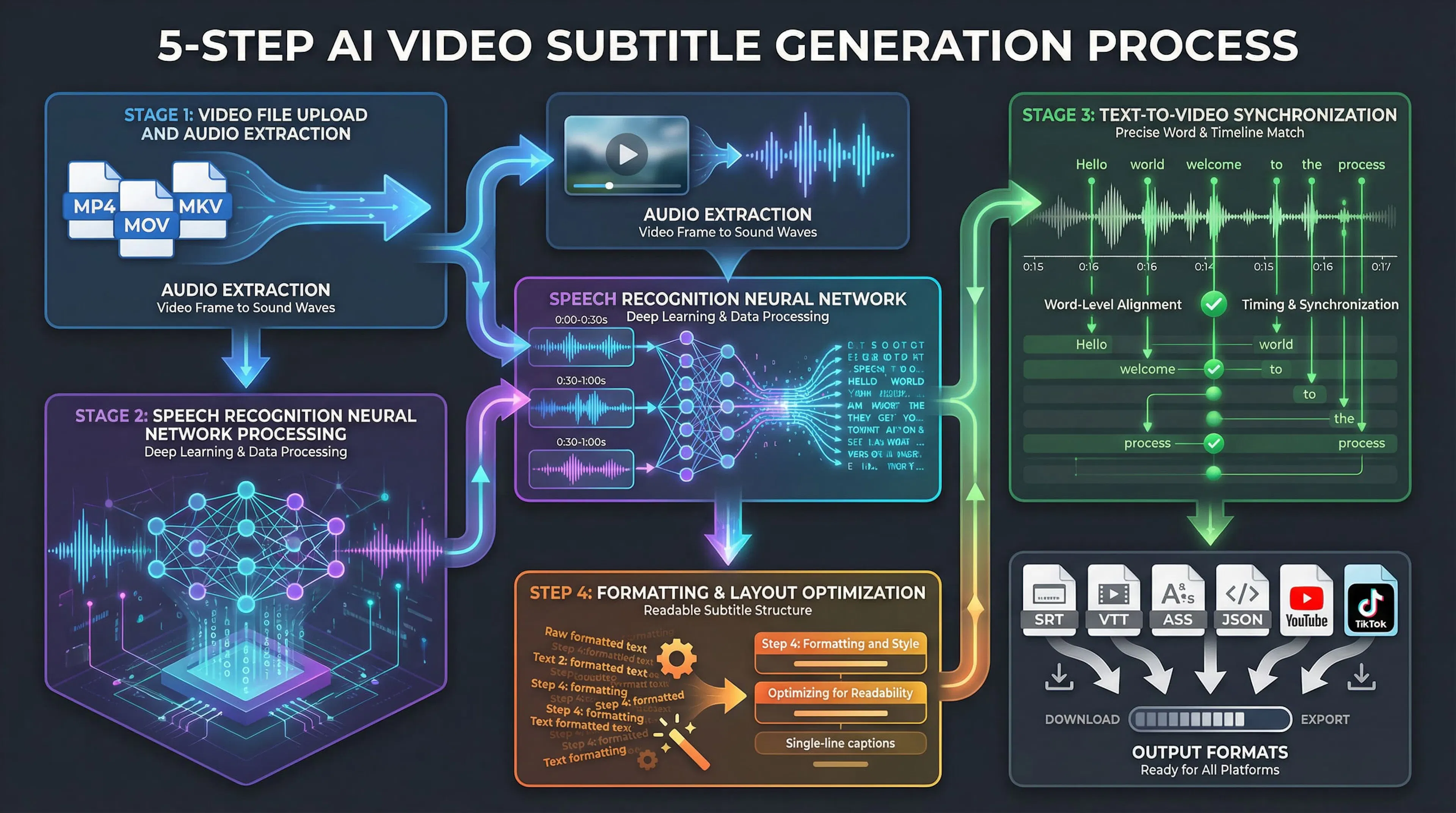
Stage 1: Uploading Video and Extracting Audio When you upload a video file (MP4, MOV, MKV, etc.), the system extracts the audio track. The video content is sent to a server, and only the audio recording is extracted. At this stage, the quality of the audio the neural network will work with is already apparent.
Stage 2: Processing by a Speech Recognition Neural Network This is where the magic happens. The neural network analyzes sound waves and converts them into text. Modern models, like OpenAI's Whisper, are trained on 1 million hours of internet audio, enabling them to recognize speech in 70+ languages. The network processes audio in small fragments (e.g., 30 seconds), allowing it to handle videos of any length without server overload. Each fragment passes through network layers that consider context and word probability.
Stage 3: Synchronizing Text and Video The system doesn't just transcribe speech. It simultaneously tracks when each word starts and ends—a process called word-level alignment. Timestamps are applied automatically, ensuring subtitles are perfectly synced with the audio.
Stage 4: Formatting and Styling The finished text is broken into lines for easy reading. The system considers line length, avoids cutting words in half, and ensures each subtitle appears on screen at precisely the right moment.
Stage 5: Exporting in the Desired Format Results can be obtained in various formats: SRT (most popular), VTT, ASS, JSON, or others. Alternatively, you can upload them directly to platforms like YouTube or TikTok.
All this is possible because the neural network is pre-trained. It doesn't need training on your specific video; it applies knowledge gained from millions of hours of diverse audio data.
Accuracy depends on audio quality. On clean recordings with studio microphones, accuracy reaches 95-99%. On videos with background noise, music, or poor microphones, accuracy drops to 75-85%. Even then, manual editing takes significantly less time than transcribing from scratch.
Automating subtitle creation has changed the game for content creators and online businesses. The benefits manifest on three levels: time savings, cost reduction, and audience expansion.
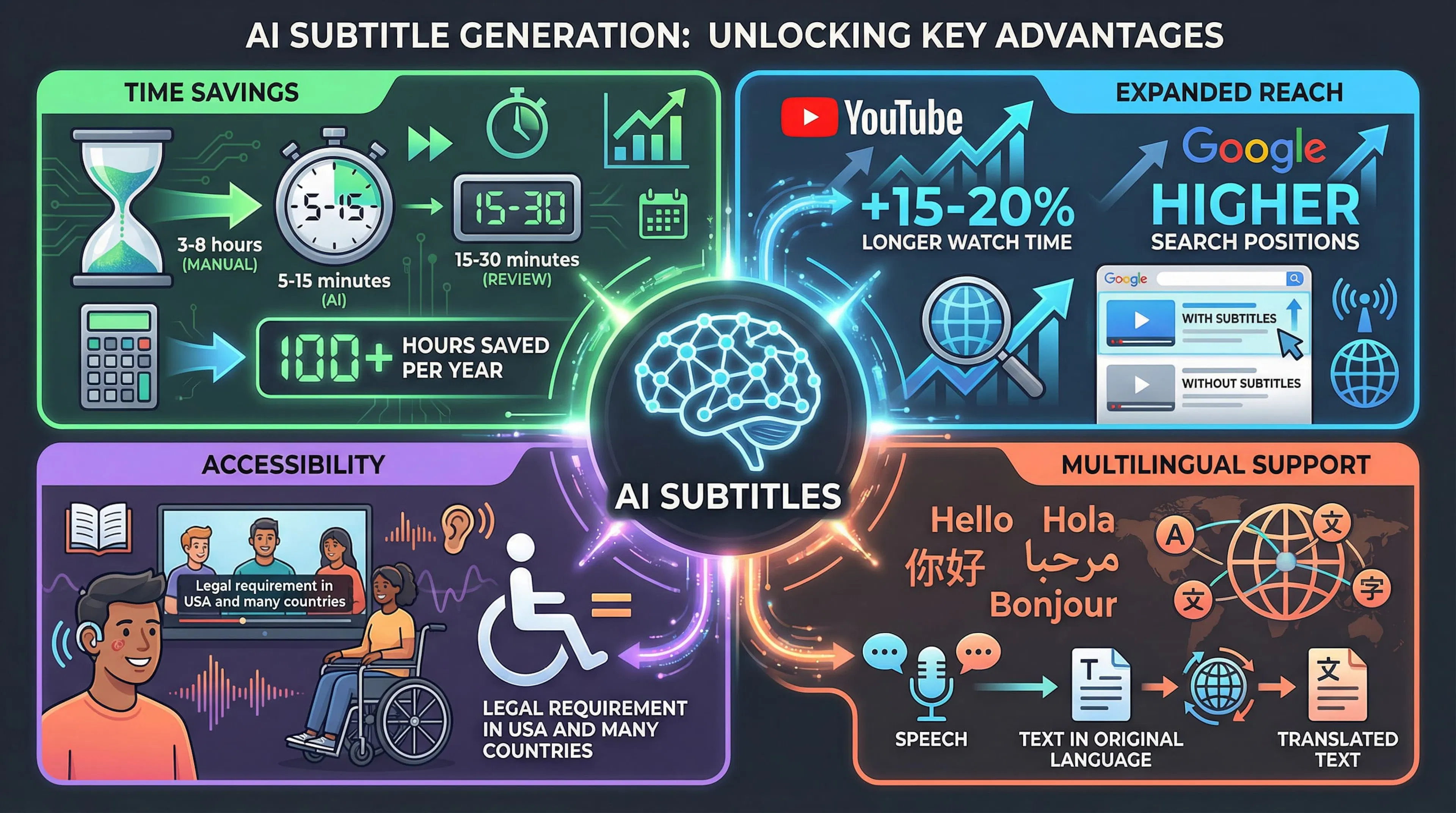
Time Savings – The Main Advantage A professional transcriptionist spends 3 to 8 hours transcribing one hour of video. With AI, this process is reduced to 5-15 minutes of processing. Afterwards, you only need to review and correct the result, which takes 15-30 minutes instead of several hours. If you upload two videos per week to YouTube, that's 7-8 hours saved per month, or nearly 100 hours per year that can be invested in creating content rather than transcribing.
Expanding Reach – A Crucial Benefit Videos with subtitles are watched 15-20% longer than those without. People in noisy environments can watch videos with sound on without missing the content. Most importantly, search engines index subtitle text. If your video mentions keywords, search engines can show it in results for those queries. This is especially vital for long-form content where key phrases are repeated. Statistics show that video content with subtitles ranks higher in search, gets more views from search results, and has better retention metrics.
Making Video Content Accessible to All Subtitles allow people with hearing impairments to fully access information. This is not just about fairness; it's a legal requirement in many countries (e.g., the ADA in the US). For educational institutions and corporate training, subtitles are often mandatory, as they aid comprehension by engaging both visual and auditory channels.
Simplifying Work with Multiple Languages If you create content for an international audience, transcribing speech is the first step towards translation. Having a ready text transcript speeds up the translation process immensely compared to manual transcription and translation.
The effect compounds: every blog post, video, or podcast created with subtitles increases search visibility, attracts more viewers, and can lead to higher ad revenue or service sales.
Video content is a powerful tool for driving traffic. However, video is a "black box" for search engines; algorithms like those of YouTube and Google can't "see" what's on screen without analyzing the audio. This is where subtitles come in.
How Search Engines Read Subtitle Text Search engines index subtitles as regular text. If your video contains the phrase "how to create video subtitles," the search engine treats it as textual content and adds the video to its index for that query. YouTube has its own auto-captions, which are indexed automatically. However, if you upload an SRT file with your transcript, the system will use your version. This is important for including precise terminology or emphasized keywords.
Keywords in Transcripts Boost Relevance When a user searches for phrases like "how to make video content attractive" or "best subtitle generator 2026," the search engine checks if these phrases appear in the video material. If they are spoken and reflected in the subtitles, the video receives an additional relevance signal. This is particularly useful for long videos. If a key phrase is repeated five times in an hour-long lecture, it strengthens the signal to the search engine about the video's topic.
CTR and Viewer Retention Increase In YouTube search results, videos with subtitles appear more complete and attractive. Users are more likely to click on videos that have full metadata (thumbnails, descriptions, duration, and captions). Statistics indicate videos with subtitles receive 15-20% more clicks from search results. Viewer retention (watch time) increases by 30-40% because people find it more convenient and don't miss audio.
Videos with Subtitles Perform Better on Social Media On platforms like TikTok and YouTube, most videos are watched without sound. People scroll through feeds on public transport, at work, or in public places. Subtitles become the primary way to convey information. Social media algorithms notice how long users watch a video. If videos without captions are scrolled past in two seconds, but videos with captions are watched for five to ten seconds, the algorithm recognizes it as valuable content and shows it to more people.
Video Transcripts as Content for Blogs and Social Media A finished transcript can serve as the basis for: blog posts, social media cards, website FAQs, or news announcements. This means one video can generate content for several days. For example, an hour-long podcast can be turned into: 10-15 social posts or a website article. This adds visibility to both the video and your channel overall.
In-Video Search Becomes Possible YouTube allows searching for timestamps within a video. With full, synchronized subtitles, viewers can find specific moments by keyword without manually scrubbing through the timeline, improving user experience and increasing watch time.
Making video content accessible is no longer just charity. In 2026, it's a legal requirement in many countries and on many platforms.
People with Hearing Impairments Are Part of Your Audience According to the WHO, over 1.5 billion people experience some degree of hearing loss, with over 430 million having disabling hearing loss. This is not a marginal group but a substantial part of the audience ready to consume video content if it's accessible. People with full or partial hearing loss watch videos, read subtitles, make purchases, and subscribe to channels. Quality subtitles open your content to this audience; their absence means losing it.
Legal Accessibility Requirements In the US, the Americans with Disabilities Act (ADA) requires video content to be accessible. In Europe, Directive 2016/2102 sets similar requirements for website and mobile app accessibility. While Russia may not have such strict laws, the global trend is clear. Major platforms (YouTube, Netflix, Amazon Prime) have already implemented policies requiring subtitles.
Platform Requirements for Video Content YouTube may require subtitles (auto or uploaded) for channel verification in some regions. Netflix demands professional subtitles for all films and series. Amazon Prime sees subtitles as a positive ranking factor. For YouTube monetization (requiring 1,000 subscribers and 4,000 watch hours), videos with subtitles, which tend to get more views, can help reach these thresholds faster.
Corporate Training and Education Companies providing online training or video courses are often obliged to include subtitles due to internal accessibility policies. This applies to large corporations and educational institutions alike. Online schools including subtitles in their standard package increase course completion rates and reach.
Improving Information Retention Research shows people remember information better when they receive it both visually and audibly. Subtitles help with concentration, especially for complex or specialized material. Students watching lectures with subtitles show results 10-15% higher than those without, even for native speakers and people with normal hearing.
Social Responsibility and Brand Trust Companies that prioritize accessibility gain additional trust from their audience. This is especially important for brands targeting younger demographics or operating in educational/social sectors. Having subtitles shows that a content creator considers diverse viewers and invests in quality, building authority and audience loyalty.
The speech recognition industry is rapidly evolving. What was impossible five years ago now works on any device.
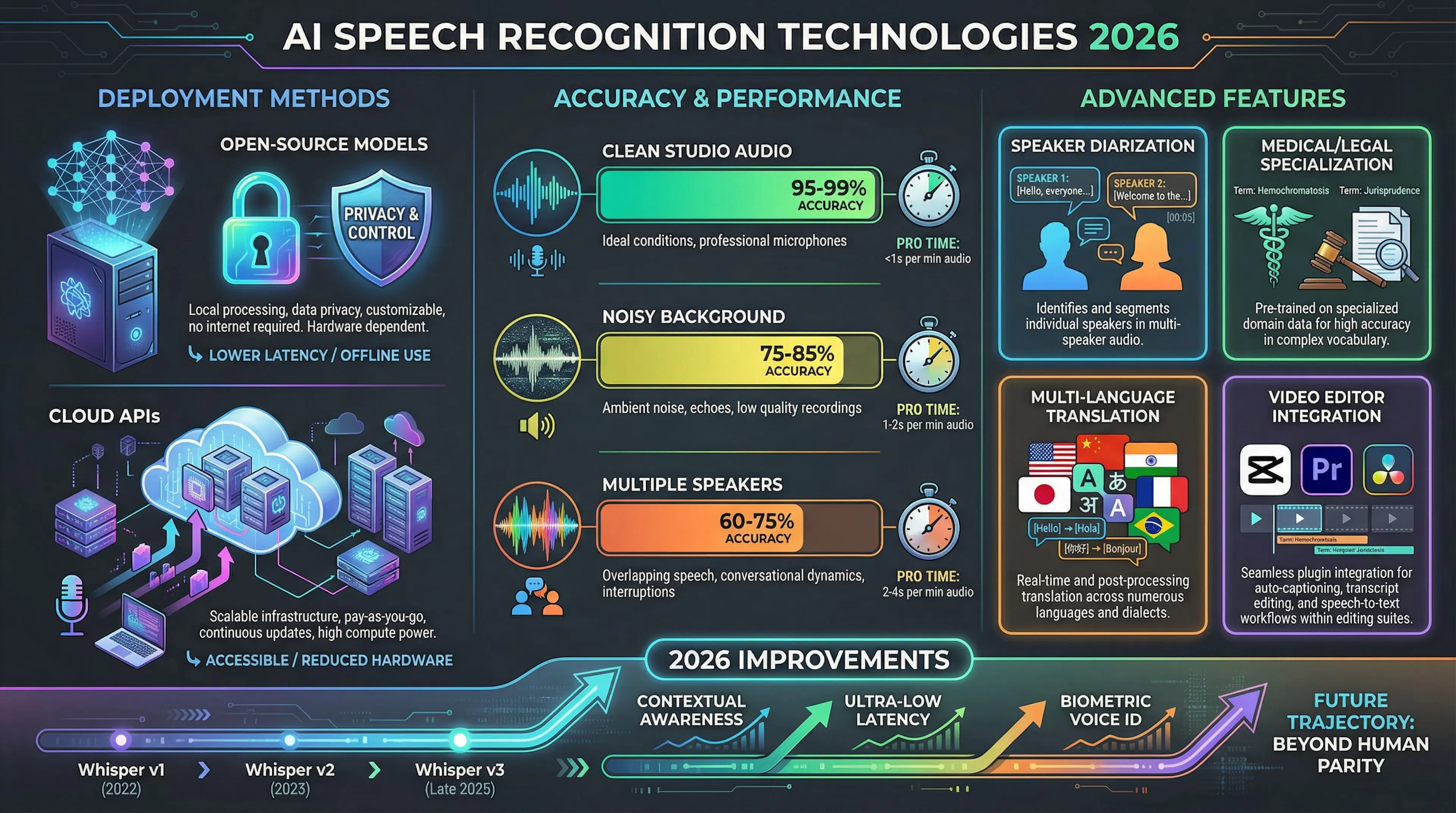
Main Approaches: Open-Source Models and Cloud APIs There are two main paths for AI subtitle creation:
Accuracy and Performance of Different Models
Processing speed varies. Cloud services process one hour of video in 1-5 minutes. Local models on a powerful GPU take 10-30 minutes.
Specialized Models & Key Features
Integration into Video Editors Most major video editors (CapCut, Adobe Premiere Pro, DaVinci Resolve) now have built-in AI subtitle generators. This allows creators to edit video and create synchronized subtitles within a single application.
When it comes to speech recognition for subtitles, Whisper by OpenAI is the industry standard. Most services you use likely run on it.
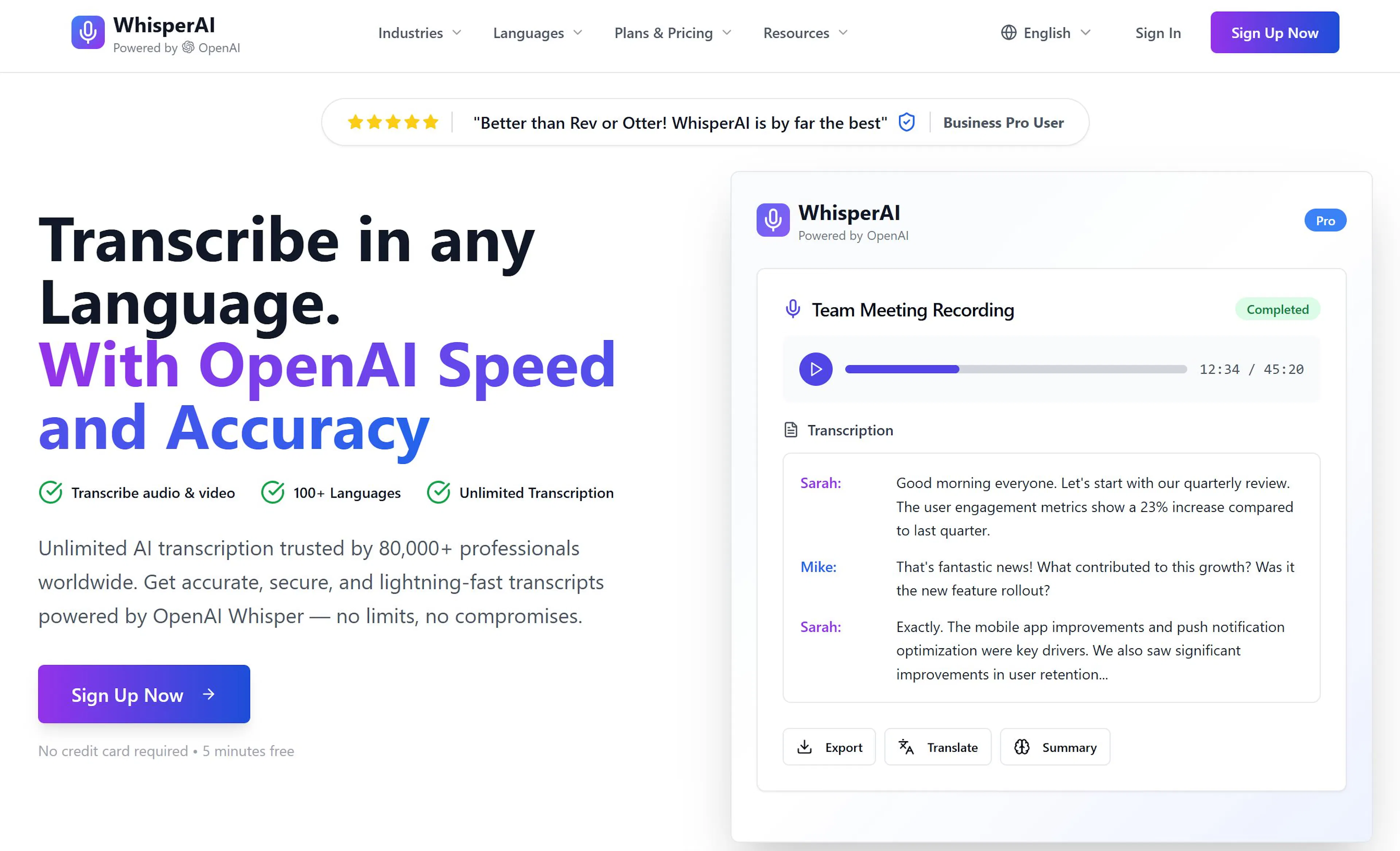
What is Whisper and Why is it So Popular? Whisper is a neural network trained on 1 million hours of diverse audio from YouTube and other sources, covering many languages, accents, and noise conditions. Released as an open-source project, it's free for anyone to use.
WhisperX – Enhanced Version with Diarization WhisperX is a modification that adds speaker diarization, identifying who is speaking when. This is invaluable for interviews, podcasts, or conversations with multiple participants. It's about 30-40% slower but provides much more structured output.
How to Use Whisper You can run Whisper locally if you have a computer (ideally with an NVIDIA GPU), Python, and the necessary libraries. A simple command like whisper video.mp4 --language en --output_format srt processes the video locally, ensuring complete data privacy.
Why Whisper is the Best Choice (Despite Imperfections) Whisper can struggle with proper nouns, specialized terms, or mixed-language words. However, these errors are quick to fix manually. For most tasks, its combination of being free, accurate, multilingual, and flexible (local/cloud) makes it the top choice.
If you don't want to deal with installing models and code, cloud services offer a user-friendly, fast alternative.
Major Cloud Providers:
Google Cloud Speech-to-Text: Supports 120+ languages. Accuracy 94-96% on clean audio. Pricing starts at ~$0.006 per audio hour. Integrates well with Google ecosystem (Drive, YouTube).
Azure Speech Services (Microsoft): Supports 85+ languages, similar accuracy to Google. Pricing from ~$1 per audio hour, with generous free tiers. Integrates with Microsoft 365 products.
AWS Transcribe (Amazon): Supports 33 languages. Slightly lower accuracy (91-93%) but often the most cost-effective among major providers (~$0.36 per video hour).
Specialized Online Subtitle Services: Services like Rev, Kapwing, Descript, Maestra, Klap, EchoWave, Wavel are built specifically for subtitle creation. They often use Whisper or proprietary models and offer integrated workflows: upload, auto-generate, edit, export. Pricing typically ranges from $0.10 to $1 per video minute, with many offering free trial minutes.
Choosing Between Cloud and Local Solutions:
Hybrid & Scalable Approaches: Many use a combination: a cloud service for fast initial transcription, then a local editor for refinement. Cloud solutions also offer automatic scalability, crucial for large projects (online schools, corporate video archives).
What You'll Need: A video file, internet access (for cloud services), an account on your chosen platform, and time for editing (~10-20% of video length).
Stage 1: Prepare Video and Audio for Optimal Recognition Audio quality is 80% of success. Ensure speech is clear, with minimal background noise. Use your video editor's tools (Noise Reduction, Normalize, Equalizer) to clean up the audio before uploading. Even a cheap lavalier microphone can dramatically improve results over built-in laptop/phone mics.
Stage 2: Upload Video and Generate Initial Subtitles
Stage 3: Edit, Synchronize, and Check Quality Open the subtitle editor. You'll see the video, the transcript, and a timeline.
Stage 4: Export and Use Subtitles on Different Platforms
Being aware of challenges helps you mitigate them.
Pro Editing Tip: Play the video at 1.5x speed—errors often become more apparent when the audio and text feel out of sync.
How accurate are AI subtitles? Accuracy depends heavily on audio quality: 95-99% on clean studio audio, 75-85% with background noise/music. Even at 80%, editing is far faster than manual transcription.
Can I create subtitles for free? Yes.
Does AI handle accents and noise well? Modern models like Whisper handle a wide range of accents well due to diverse training data. Noise is a bigger challenge and significantly lowers accuracy—always use noise suppression first.
What languages are supported? Most top services support 70-100+ languages. Check a service's website for specific language lists, especially for less common languages or dialects.
Are AI subtitles suitable for commercial projects? Absolutely. They are a professional tool. For commercial use, prioritize high-accuracy services (95%+). Ensure you have the rights to the video content you are subtitling.
How long does it take to create subtitles?
Which subtitle format should I choose?
What if the subtitles are completely wrong? This usually indicates very poor source audio. Solutions: 1) Improve the audio and retry. 2) Try a different service/model. 3) For critical content, consider manual transcription.
The technology for creating video subtitles using neural networks is now a robust, working tool that saves hours of labor and opens content to millions.
Five years ago, subtitle creation was expensive and slow. Today, AI handles it in minutes. The quality is so high that editing only takes 10-30% of the original video length.
By integrating AI subtitles into your workflow, you enhance accessibility, boost SEO, improve viewer retention, and expand your global reach—all while reclaiming precious time for creativity.

Max Godymchyk
Entrepreneur, marketer, author of articles on artificial intelligence, art and design. Customizes businesses and makes people fall in love with modern technologies.